
Every new enquiry in one list, until it’s won or lost.
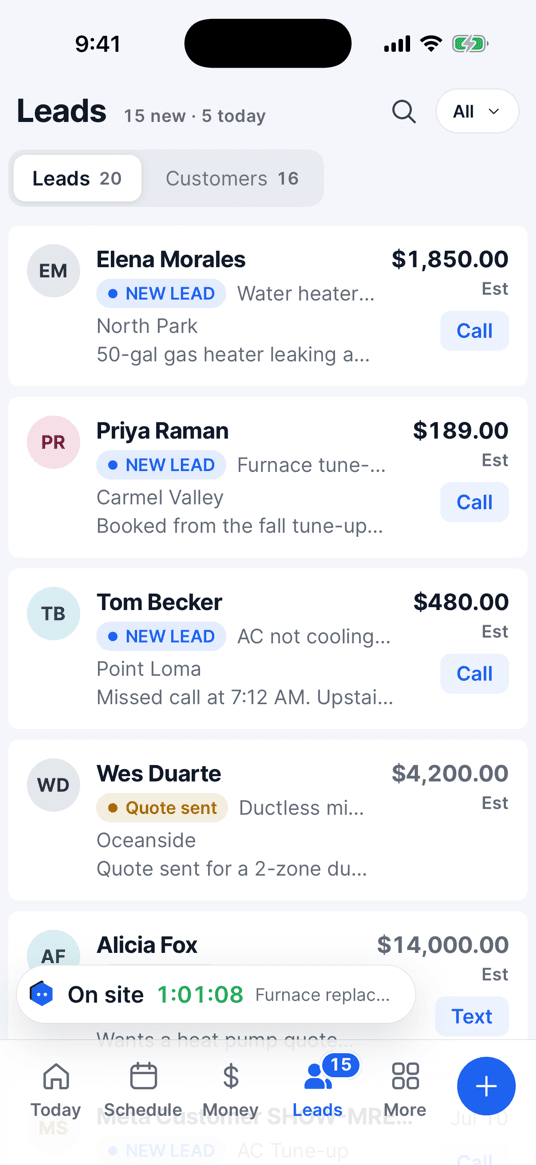
Leads from your ads, directories, calls and booking page land in one list. Move each one through Contacted, Quoted, Won or Lost, and see which sources pay off.
What it does
Every source together
Facebook lead ads, Google Local Services, Thumbtack, Yelp and Angi in one place.
Clear stages
Contacted, Quoted, Won or Lost.
Missed-call text-back
A text goes out when you miss a call, so the caller doesn’t move on.
Lead source results
See which ads brought in paying work.
How it works
Connect your lead sources.
Each new enquiry lands in Leads.
Reply, quote and move it along.
Won leads become customers with their history.
What’s included
In every plan. The computer and the iPhone app share one account.
| Feature | Computer | iPhone |
|---|---|---|
| Leads listEvery new enquiry, moved through Contacted, Quoted, Won or Lost | ✓ | ✓ |
| Lead sourcesFacebook lead ads, Google Local Services, Thumbtack, Yelp and Angi land in one list | ✓ | ✓ |
| Online booking requestsBookings from your booking page, waiting for you to confirm | ✓ | ✓ |
| Follow-upsWho to chase today: open quotes, unpaid invoices and quiet leads | ✓ | ✓ |
| Missed-call text-backA text goes out when you miss a call | ✓ | ✓ |
| Duplicate finderFinds and merges customers and leads with the same phone, email or name | ✓ | ✓ |
| Lead source resultsWhich ads paid off | ✓ | ✓ |
Questions people ask.
Are leads and customers kept separate?
Yes. A lead is someone who has asked; a customer is someone you have worked for. A won lead becomes a customer.