
Quotes your customer can pick, sign and pay a deposit on.
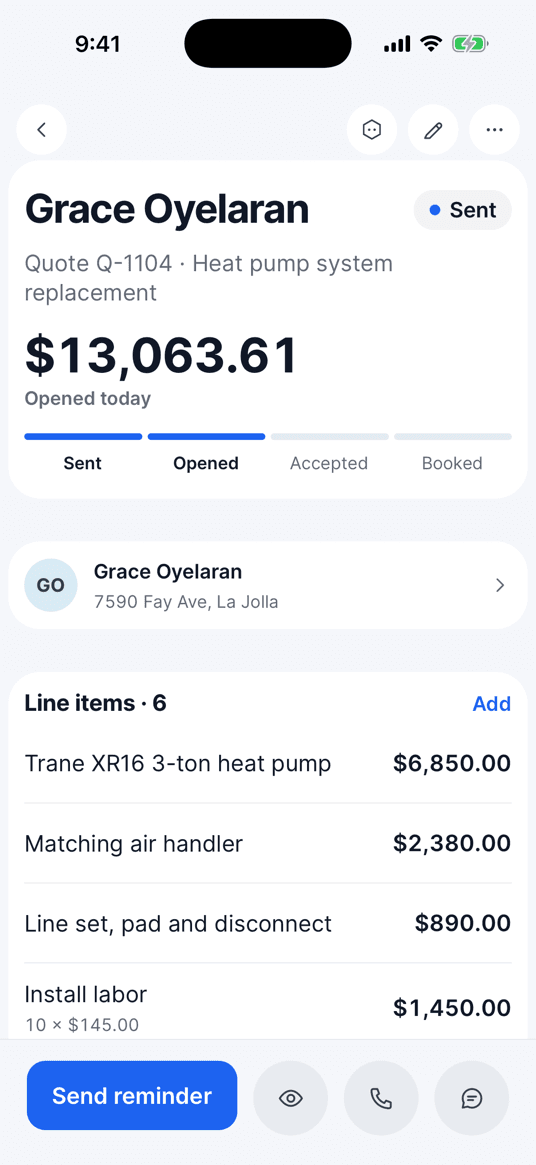
Build a quote from your price book in a few taps. Offer more than one option, send it by text or email, and the customer picks one, signs it and pays the deposit from their phone.
What it does
Good, Better, Best
Put several priced options on one quote. The customer chooses the one they want.
Signed online or on site
They sign from the link, or you hand them the phone and they sign there.
Deposits
Ask for a deposit on the quote and collect it when they accept.
Follow-ups until they answer
Reminders go out on an unanswered quote so you don’t have to chase it.
Accepted quote to job
Turn the accepted quote into a scheduled job without typing it again.
How it works
Add services and materials from your price book, with tax and your logo.
Add options if you want to offer more than one price.
Send it by text or email, or present it in person.
They pick, sign and pay the deposit. You schedule the job.
What’s included
In every plan. The computer and the iPhone app share one account.
| Feature | Computer | iPhone |
|---|---|---|
| Quotes from your price bookLine items, tax and your logo | ✓ | ✓ |
| Good / Better / BestSeveral priced options on one quote | ✓ | ✓ |
| Present and sign in personThe customer picks an option and signs on the spot | ✓ | ✓ |
| DepositsAsk for a deposit and collect it when they accept | ✓ | ✓ |
| Financing offersAdd a financing offer to a quote or invoice | ✓ | ✓ |
| AI quote draftsOmni drafts the quote; you check it before it goes | ✓ | ✓ |
| Quote from job photosOmni drafts a quote from the photos on a job | — | ✓ |
| Quote follow-upsReminders until the customer answers | ✓ | ✓ |
| Quote to jobTurn an accepted quote into a scheduled job | ✓ | ✓ |
| Online quotesThey pick an option and sign | ✓ | ✓ |
Questions people ask.
Can customers sign a quote without an account?
Yes. The quote opens from a link on any phone or computer. There is nothing for them to download or sign up for.
Are optional add-ons ticked for the customer?
No. Optional lines arrive unticked, and the customer adds the ones they want.
Can Omni write the quote?
Omni can draft a quote, and on the iPhone it can draft one from the photos on a job. You check the draft before it is sent.