
See every job and every truck, and move work in one drag.
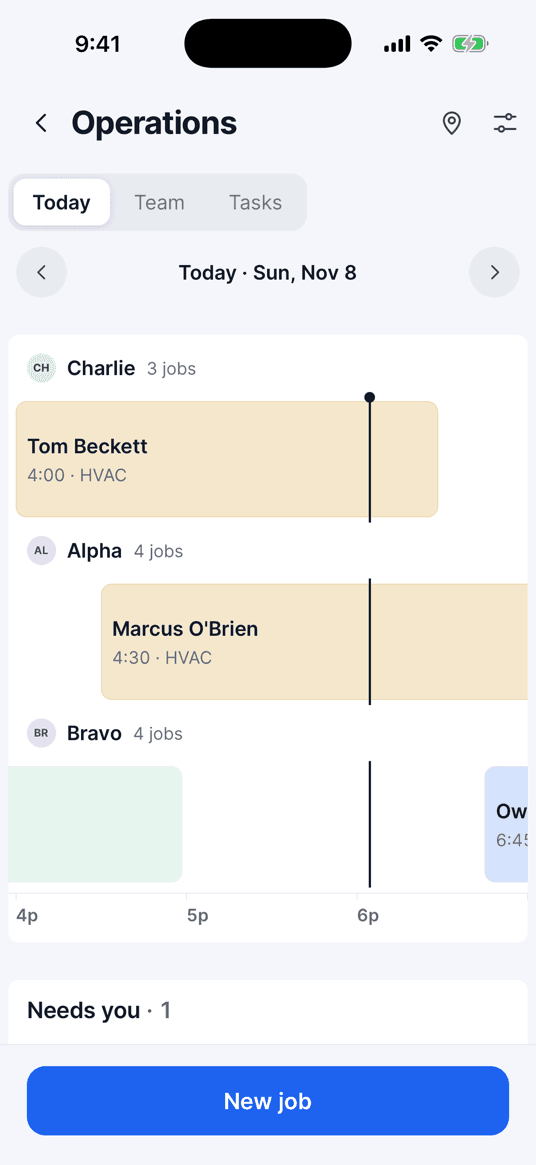
The schedule shows who is where today, what is next and what is still unassigned. Drag a job to another crew, put a day in driving order and fill a cancelled slot without phoning around.
What it does
Calendar and map
Day, week and month views, and a live map of today’s jobs and where each tech is.
Crew lanes
Every crew’s day side by side on the computer. Drag a job between them.
Route planning
Put a day in driving order across every truck.
Assign with Omni
Omni suggests who takes which job. Nothing moves until you approve it.
Fill a cancelled slot
Offer the open time to other customers when a visit is cancelled.
How it works
Book the job from a quote, a call or a booking request.
Find a time inside your hours and assign a crew.
Plan the route for the day.
The tech sees it on My Day and the customer gets an on-my-way text.
What’s included
In every plan. The computer and the iPhone app share one account.
| Feature | Computer | iPhone |
|---|---|---|
| CalendarDay, week and month views | ✓ | ✓ |
| Live mapToday’s jobs and where each tech is | ✓ | ✓ |
| Crew lanesEvery crew’s day side by side; drag jobs between them | ✓ | — |
| Assign with OmniOmni suggests who takes what; you approve | ✓ | ✓ |
| Auto-assignHand out unassigned jobs in one click | ✓ | — |
| Route planningPut a day in driving order, across every truck | ✓ | ✓ |
| Weekly routesRepeating weekday loops of customers in driving order | ✓ | ✓ |
| Recurring jobsJobs that repeat, with skip and pause | ✓ | ✓ |
| Find a timeOpen slots inside your hours | ✓ | ✓ |
| Fill a cancelled slotOffer the open time to other customers | ✓ | ✓ |
| Crew capacityShows which crews are over- or under-booked | ✓ | — |
| Print the day sheetA crew’s run on paper: stops, times, phones and access notes | ✓ | — |
| Google Calendar syncJobs show on your Google Calendar | ✓ | ✓ |
Questions people ask.
Do my techs see schedule changes right away?
Yes. The computer and the iPhone app share one account, so a job moved in the office shows on the tech’s My Day.
Can I print a crew’s day?
Yes. The day sheet prints a crew’s stops, times, phone numbers and access notes.