
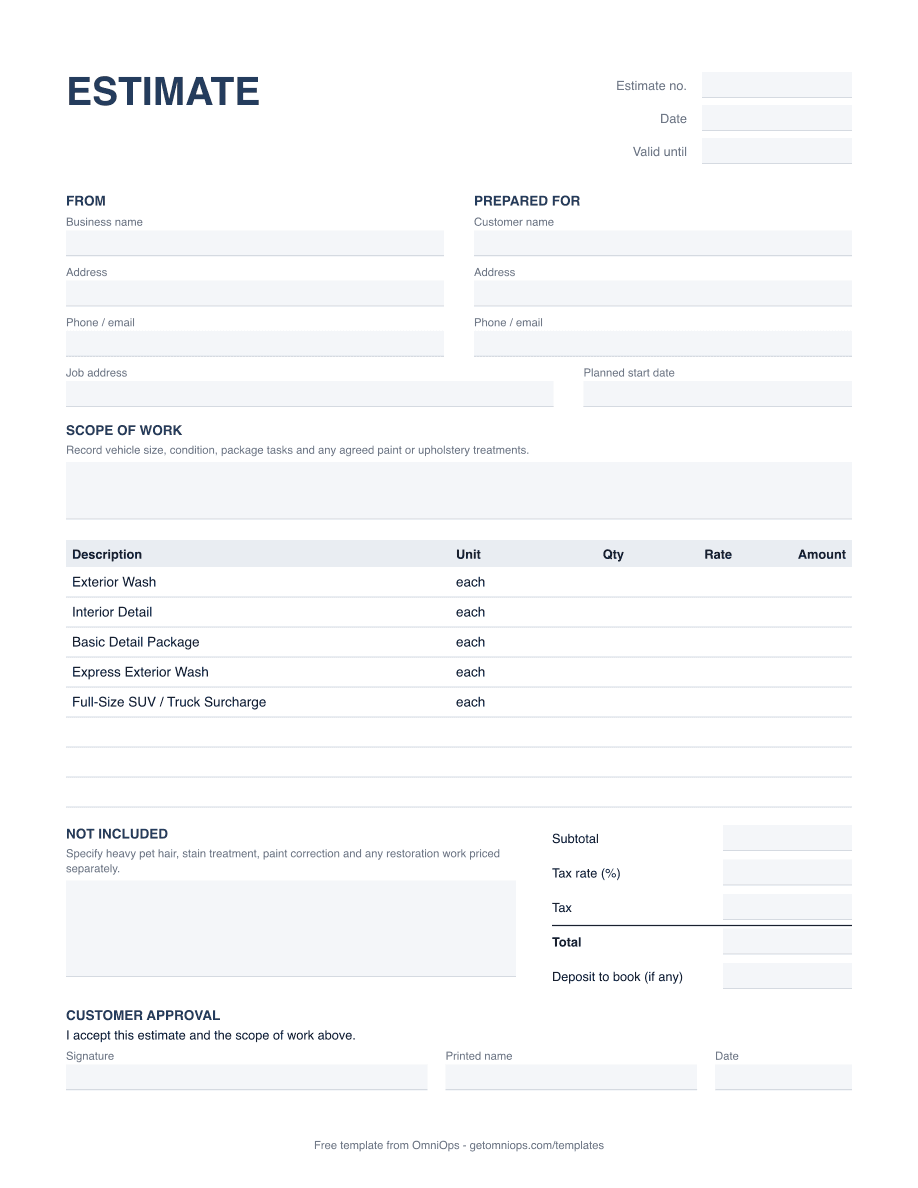
What to put on a auto detailing estimate
Start with what every estimate needs, then list the work the way you charge for it.
- Your business name, address, phone and email.
- The customer’s name and the job address.
- An estimate number, the date and how long the price holds.
- The scope of work: what you will do, where and how often.
- Each piece of work on its own line, with the unit, quantity, rate and amount.
- The subtotal, the tax rate and tax, and the total, plus any deposit you need to book the job.
- What is not included, so extra work is priced before you do it.
- A place for the customer to sign and date their approval.
| Line | Unit | Type of work |
|---|---|---|
| Exterior Wash | each | Exterior |
| Interior Detail | each | Interior |
| Basic Detail Package | each | Packages |
| Express Exterior Wash | each | Wash & Maintenance Services |
| Full-Size SUV / Truck Surcharge | each | Vehicle Size Tiers |
The same price book prices auto detailing work in these ways: a set price per job or item, per visit and by the hour. Write the unit on every line, so the customer can check each amount.
Other auto detailing work you might list: exterior, interior, packages, wash & maintenance services, vehicle size tiers, paint correction & polishing, paint protection & coatings, interior deep clean & restoration, add-ons & upsells and detail packages & bundles.
Scope of work: Record vehicle size, condition, package tasks and any agreed paint or upholstery treatments.
Not included: Specify heavy pet hair, stain treatment, paint correction and any restoration work priced separately.
How to fill in the auto detailing estimate template
- Download the file you want to work in. In the PDF, click a box and type. In the Word file, replace the words in brackets. In Excel or Google Sheets, type in the blank cells.
- Fill in your business details and save a copy as your own blank, so the next one starts with them.
- Give the estimate a number, today’s date and a “valid until” date.
- Under “Scope of work”, describe the job. Record vehicle size, condition, package tasks and any agreed paint or upholstery treatments.
- Change or delete the sample lines and add your own. Enter the quantity and your rate on each line. The Excel file works out each amount, the tax and the total; in the PDF and Word files, add them up and type them in.
- Under “Not included”, list what the price leaves out. Specify heavy pet hair, stain treatment, paint correction and any restoration work priced separately.
- Save it as a PDF and send it. When the customer agrees, ask them to sign and date the approval line and keep the signed copy.