Skip to main contentSkip to navigation
Switching apps? We move your data over, free.How it works

Free pest control estimate template

A blank pest control estimate template with general pest and termites lines already listed. Download it as a fillable PDF, a Word file or an Excel file, add your prices and send it. No signup.

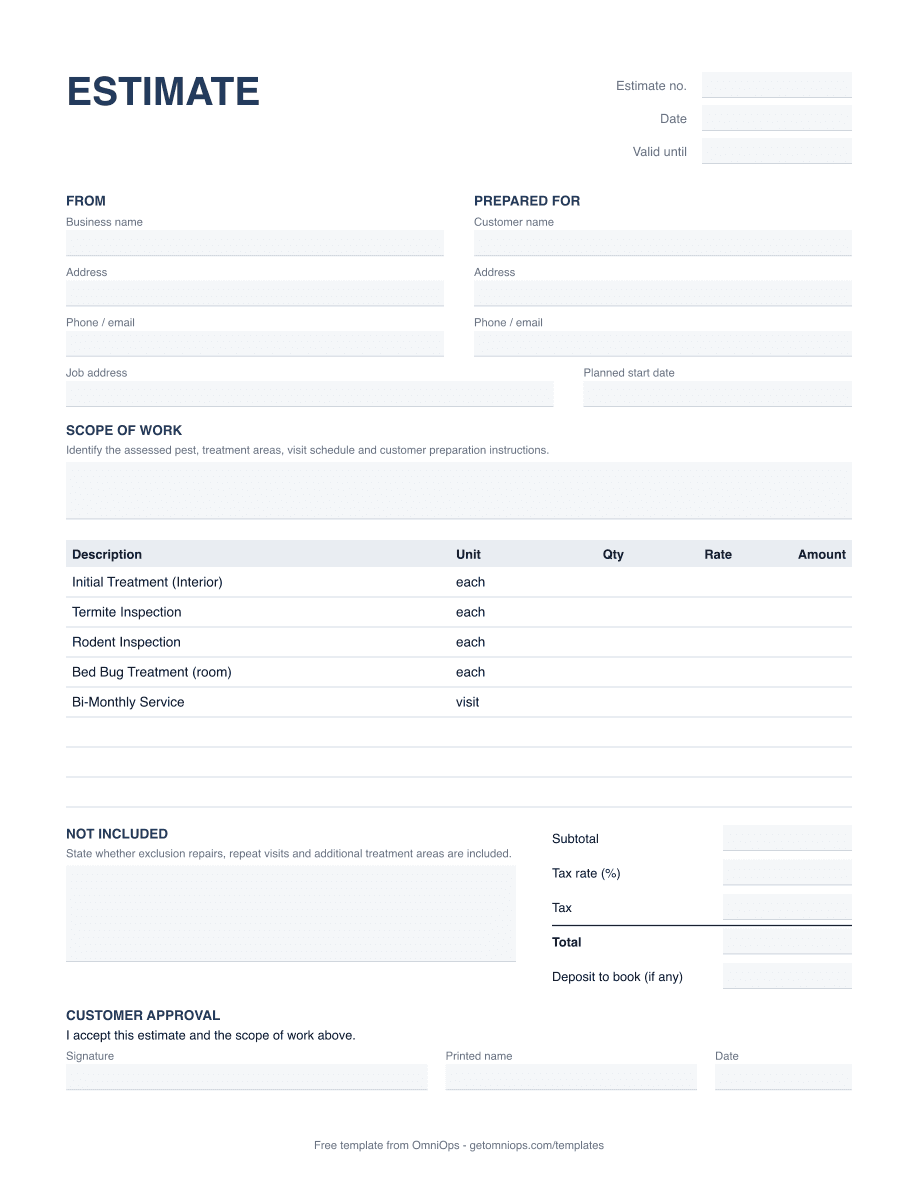
Page 1 of the pest control estimate template: your details, the customer, scope of work, line items with Initial Treatment (Interior), and totals
Page 1 of the PDF. The Word and Excel files have the same sections.

Download the template

  • PDF: Fill in the boxes on screen in any PDF reader, or print it and write on it.
  • Word: Opens in Word, Google Docs and Pages. Replace the words in brackets.
  • Excel: Opens in Excel and Google Sheets. Amounts and totals add up as you type.

Rather fill it in online? The free pest control quote generator adds your logo, works out the totals and downloads a PDF.

What to put on a pest control estimate

Start with what every estimate needs, then list the work the way you charge for it.

  • Your business name, address, phone and email.
  • The customer’s name and the job address.
  • An estimate number, the date and how long the price holds.
  • The scope of work: what you will do, where and how often.
  • Each piece of work on its own line, with the unit, quantity, rate and amount.
  • The subtotal, the tax rate and tax, and the total, plus any deposit you need to book the job.
  • What is not included, so extra work is priced before you do it.
  • A place for the customer to sign and date their approval.
The sample lines in this template, from the OmniOps pest control starter price book
LineUnitType of work
Initial Treatment (Interior)eachGeneral Pest
Termite InspectioneachTermites
Rodent InspectioneachRodent Control
Bed Bug Treatment (room)eachSpecialty
Bi-Monthly ServicevisitRecurring Plans & Agreements

The same price book prices pest control work in these ways: a set price per job or item, by the linear foot, per visit, by the gallon, by the hour, by the square foot and by the room. Write the unit on every line, so the customer can check each amount.

Other pest control work you might list: general pest, termites, rodent control, specialty, recurring plans & agreements, inspections & reports, termite & wood-destroying insects, bed bug & heat treatment, rodent & wildlife and exclusion & pest proofing.

Scope of work: Identify the assessed pest, treatment areas, visit schedule and customer preparation instructions.

Not included: State whether exclusion repairs, repeat visits and additional treatment areas are included.

How to fill in the pest control estimate template

  1. Download the file you want to work in. In the PDF, click a box and type. In the Word file, replace the words in brackets. In Excel or Google Sheets, type in the blank cells.
  2. Fill in your business details and save a copy as your own blank, so the next one starts with them.
  3. Give the estimate a number, today’s date and a “valid until” date.
  4. Under “Scope of work”, describe the job. Identify the assessed pest, treatment areas, visit schedule and customer preparation instructions.
  5. Change or delete the sample lines and add your own. Enter the quantity and your rate on each line. The Excel file works out each amount, the tax and the total; in the PDF and Word files, add them up and type them in.
  6. Under “Not included”, list what the price leaves out. State whether exclusion repairs, repeat visits and additional treatment areas are included.
  7. Save it as a PDF and send it. When the customer agrees, ask them to sign and date the approval line and keep the signed copy.

Questions about the pest control estimate template

Is this pest control estimate template free?

Yes. Download the PDF, Word or Excel file and use it for your business without an account. A small line at the bottom says where the template came from; you can delete it in the Word and Excel files.

What should a pest control estimate say about the work?

Identify the assessed pest, treatment areas, visit schedule and customer preparation instructions. State whether exclusion repairs, repeat visits and additional treatment areas are included.

Can I use it in Google Docs or Google Sheets?

Yes. Upload the Word file to Google Drive and open it with Google Docs. For Google Sheets, open a new sheet and choose File, then Import, and pick the Excel file; the formulas that add up the totals keep working.

Which file should I download?

The Excel file if you want the amounts and total worked out for you. The PDF if you want to type in boxes or print it and write on it. The Word file if you want to change the layout, add your logo or add sections.

Why are the prices blank?

What you charge depends on your costs, your area and the job, so the template lists the work and leaves the rates to you.

What is the difference between an estimate and a quote?

People use the words for the same thing: the price you propose before the work starts. Some trades call a fixed price a quote and a price that may change once work starts an estimate. Whichever word you use, say how long the price holds and what is not included.

Send estimates from your phone instead

In OmniOps, you build the estimate from your own price book, send it by text or email, and the customer accepts it online.

Start my 14-day trial

No card needed.

Try it free for 14 days.

Questions first? Email me: hello@getomniops.com

Pest Control Estimate Template (PDF, Word, Excel) — OmniOps